I’ve used your current AllSchools resources sitemap to connect this with your existing guides on positioning, school outreach, supplier websites, case studies, proposals, compliance and school buying. :chatgpt-content-reference{index="0"} # How to Build a School-Specific Landing Page That Supports Sales
You send a school an email.
The subject line works.
The right person opens it.
They click through to your website.
Then they land on a homepage written for everyone.
It talks about businesses.
Families.
Corporate clients.
Healthcare.
Hospitality.
Schools appear somewhere near the bottom.
The visitor has to work out whether your offer is actually relevant to education.
Many will not bother.
This is where a school-specific landing page can help.
A good school landing page is not simply your normal website with the phrase “for schools” added to the heading.
It should make a school buyer feel that you understand:
- their environment;
- their problem;
- their decision-making process;
- the questions they need answered before they can buy.
It should also support your sales process.
If a school leader clicks through after an email, looks you up after a referral or forwards your page to a colleague, the page should make the next step easier.
This guide explains how to structure a school-specific landing page, what information to include, what to leave out and how to make the page useful to both the person interested in your product and the people who may need to approve it.
Start with one school problem, not your company story
The first screen of the page should answer:
“Why should somebody working in a school keep reading?”
Lead with the problem or outcome
For example:
“Reduce the admin involved in managing school trips.”
or:
“Help teachers identify pupils who are beginning to fall behind.”
or:
“Reliable IT support designed for schools without a large internal team.”
Avoid generic headlines
Weak examples include:
“Innovative solutions for modern organisations.”
“Helping clients unlock their potential.”
“Your trusted partner for excellence.”
These could describe almost anything.
Tell the school what the offer does
The visitor should be able to understand within a few seconds:
- what you sell;
- who it is for;
- what problem it solves.
The AllSchools guide How to Position Your Product or Service for UK Schools is useful if the message itself still feels too broad.
Make the page specific enough to feel relevant
“For education” can still be too vague.
A nursery, primary school, secondary school, special school and MAT central team can have very different needs.
Segment where it materially changes the offer
You might create separate pages for:
- primary schools;
- secondary schools;
- MATs;
- SEND provision;
- particular departments.
Do not create dozens of almost-identical pages
A separate landing page is worthwhile when:
- the problem changes;
- the buyer changes;
- the evidence changes;
- the pricing changes;
- implementation changes.
If none of those changes, one strong page may be better.
Use language the school recognises
For example, a school reader may understand:
- SENCO;
- SLT;
- MAT;
- pupil premium;
- Key Stage 2;
- GCSE;
- school business manager.
Use sector language naturally where it improves clarity.
Do not fill the page with acronyms simply to sound educational.
If your offer spans phases, see Selling to Primary Schools vs Secondary Schools: What Changes?.
Show the outcome before the feature list
Suppliers naturally want to explain what their product contains.
School buyers usually care first about what changes if they buy it.
Compare these two approaches
Feature:
“Includes automated reporting dashboards.”
Outcome:
“Give pastoral leaders a clear view of attendance patterns without manually combining multiple spreadsheets.”
Features still matter
They simply make more sense once the buyer understands why they matter.
A useful page sequence is
Problem → outcome → how it works → evidence → buying information.
That mirrors the questions a potential buyer is likely to ask.
Make it clear who inside the school the page is for
Different school roles care about different things.
A generic page can try to speak to everybody and end up speaking to nobody.
Name the likely users or buyers
For example:
“Designed for SENCOs, inclusion leads and school leaders.”
or:
“For school business managers and operations teams looking to reduce premises administration.”
This helps the visitor self-qualify
If somebody forwards the page internally, their colleague immediately understands why they are receiving it.
Remember that user and buyer may differ
The teacher may use your product.
The department head may want it.
The business manager may check the price.
IT may approve the technical setup.
Senior leadership may approve the final purchase.
A good page contains enough information for more than one of those readers.
See Who Buys Products and Services in UK Schools? for a broader explanation of school buying roles.
Use school-specific evidence
A testimonial from a restaurant owner does not prove much to a headteacher.
Even if the underlying service is excellent.
Use evidence from similar schools where possible
This might include:
- a primary-school case study;
- a secondary-school example;
- a MAT deployment;
- a quote from a headteacher;
- a measurable outcome.
Specific evidence is stronger than broad claims
Compare:
“Schools love our platform.”
with:
“Used across eight schools in one MAT to replace separate spreadsheet-based processes.”
Explain the starting point
A useful case study can show:
- what the school was struggling with;
- why it chose you;
- how implementation worked;
- what changed afterwards.
This helps another school decide whether the example resembles its own situation.
For more on building useful proof, see How to Get a Case Study or Testimonial From a School and Use It to Win More Work.
Explain how implementation actually works
School buyers often worry less about what a product can theoretically do than about what buying it will create for staff next Monday morning.
Answer practical questions
For example:
- How long does setup take?
- Who needs to be involved?
- Do staff need training?
- Do you import existing data?
- Can implementation happen during term time?
- What support is included?
Reduce perceived workload
If implementation is genuinely simple, say exactly why.
For example:
“We configure the account, import your existing pupil data and run a 45-minute staff setup session.”
That is more useful than:
“Easy onboarding included.”
Be realistic
If rollout takes six weeks, do not imply it takes an afternoon.
Schools are more likely to trust a clear implementation plan than an implausible claim that there is “zero work required”.
Answer procurement questions before they become blockers
A school-specific landing page can do something a generic product page often does not:
help the buyer prepare an internal case.
Include relevant purchasing information
Depending on your offer, this may include:
- pricing or starting price;
- contract length;
- whether VAT applies;
- payment terms;
- renewal terms;
- framework availability;
- purchase-order process.
Do not hide every price by default
There are situations where bespoke pricing is necessary.
But if every school has to book a 30-minute sales call simply to discover that your product starts at £18,000 per year, you may waste everybody's time.
Use pricing that helps qualification
You could say:
“Annual school licences from £1,250, depending on pupil numbers.”
or:
“Projects typically range from £3,000 to £8,000.”
This gives the school enough information to judge whether the conversation is realistic.
The AllSchools guides How to Price Your Services for Schools and School Procurement Thresholds: What Small Suppliers Need to Understand cover these issues in more detail.
Put compliance information where buyers can find it
Once interest becomes serious, schools may need reassurance around compliance.
Relevant information may include
- DBS arrangements;
- safeguarding;
- insurance;
- data protection;
- cyber security;
- risk assessments;
- health and safety;
- accessibility.
Do not put twenty certificates above the headline
The page should still sell the outcome first.
But create a clear section such as:
Information for school procurement teams
or:
Compliance and safeguarding
Link to documents where appropriate
You might provide:
- insurance certificate;
- privacy information;
- data-processing agreement;
- safeguarding statement;
- terms.
That can prevent your internal champion having to email you repeatedly for paperwork.
See School Supplier Compliance Checklist and What Documents Should a School Supplier Have Ready?.
Make the page easy to forward internally
This is an important but overlooked purpose of a school landing page.
The person who first visits may not be the final decision-maker.
Imagine the internal journey
A teacher sees your product.
They send the link to the head of department.
The department head forwards it to the business manager.
The business manager sends it to IT.
If every reader can find the information they need, the page supports the sale without requiring you to be present at every step.
Include sections for different concerns
For example:
For teachers: how it works day to day.
For school leaders: impact and implementation.
For finance: cost and contract.
For IT: security and integration.
Do not necessarily make these four separate pages
One well-structured page can answer all four audiences while keeping the main story coherent.
Use screenshots, examples and real context
Stock photographs of smiling pupils can make a page look educational.
They rarely explain the product.
Show what the school will actually get
Depending on what you sell, use:
- screenshots;
- sample reports;
- resource previews;
- before-and-after examples;
- short product videos;
- photos of the service in a genuine school context.
Make screenshots legible
A tiny software screenshot placed inside a laptop mock-up may look attractive but tell the user nothing.
Show the part that matters.
Caption images with the benefit
Instead of:
“Dashboard screen.”
use:
“Attendance leads can identify pupils whose attendance has begun to decline without exporting separate reports.”
The caption becomes part of the sales argument.
Use one main call to action
A page becomes confusing when every section asks the visitor to do something different.
You may see:
- Book a demo
- Download brochure
- Contact us
- Start free trial
- Subscribe
- Join webinar
- Request quote
all competing on the same screen.
Choose the most natural next step
For higher-value services, this may be:
Book a short call.
For software:
Request a demo.
For a clearly priced product:
Start a school trial.
For a bespoke service:
Request a quote.
Add a lower-pressure alternative if helpful
For example:
Not ready for a call? Download the school information pack.
But keep one action visually dominant.
Make the contact form suitable for a school enquiry
A generic contact form asking only for:
- name;
- email;
- message;
may work.
But a school-specific form can help you qualify the enquiry without becoming intrusive.
Useful fields might include
- name;
- school;
- role;
- school email;
- what they want help with.
Ask only what you will actually use
Do not demand:
- pupil numbers;
- full address;
- budget;
- telephone number;
- MAT name;
- procurement deadline;
before the visitor can even ask a question unless those fields genuinely matter.
Reduce perceived commitment
“Book a sales consultation” may feel heavy.
“Talk through whether this would work for your school” can feel more natural.
The wording should match the actual call.
Build the landing page around your outreach
A landing page works particularly well when it continues the conversation started in your email.
Match the message
If your outreach email says:
“We help small primary schools reduce the admin involved in staff absence cover.”
the landing page should not open with:
“Enterprise workforce transformation solutions.”
Create continuity
The email identifies the problem.
The page explains the solution.
The case study proves it.
The CTA creates the next step.
Use campaign-specific pages when useful
If you are running a campaign aimed specifically at:
- SENCOs;
- school business managers;
- secondary science departments;
- MAT finance teams;
a dedicated landing page may convert better than sending everybody to the same general schools page.
See How to Write a School Outreach Email That Gets a Reply and How to Write a September Email That School Leaders Will Actually Read.
Remove the things that make school buyers hesitate
A landing page should not only create interest.
It should remove reasons to delay.
Common unanswered questions include
“Will this work in a school our size?”
“Is this suitable for primary?”
“How much does it cost?”
“How long will implementation take?”
“Do you already work with schools?”
“Will IT need to get involved?”
“Can you provide the paperwork procurement will ask for?”
Turn these into page sections or FAQs
Every useful answer reduces friction.
Do not answer objections nobody has
A page can become bloated if it attempts to address every theoretical concern.
Use questions that actually arise in:
- sales calls;
- emails;
- demos;
- procurement conversations.
Your sales process should help improve the page over time.
Measure whether the page actually supports sales
A beautiful landing page is not automatically an effective one.
Useful measures might include
- email-to-page click rate;
- demo enquiries;
- quote requests;
- brochure downloads;
- sales-qualified enquiries;
- conversion by school segment.
Do not focus only on form submissions
A school may:
- visit the page;
- forward it internally;
- return two weeks later;
- then contact you directly.
School sales can have a longer decision cycle than many consumer purchases.
See How Long Does It Take to Sell to a School?.
Ask new leads what helped
A simple sales question can reveal more than analytics:
“Was there anything on the website that helped you decide to get in touch?”
If several buyers mention pricing, case studies or implementation information, you know those sections matter.
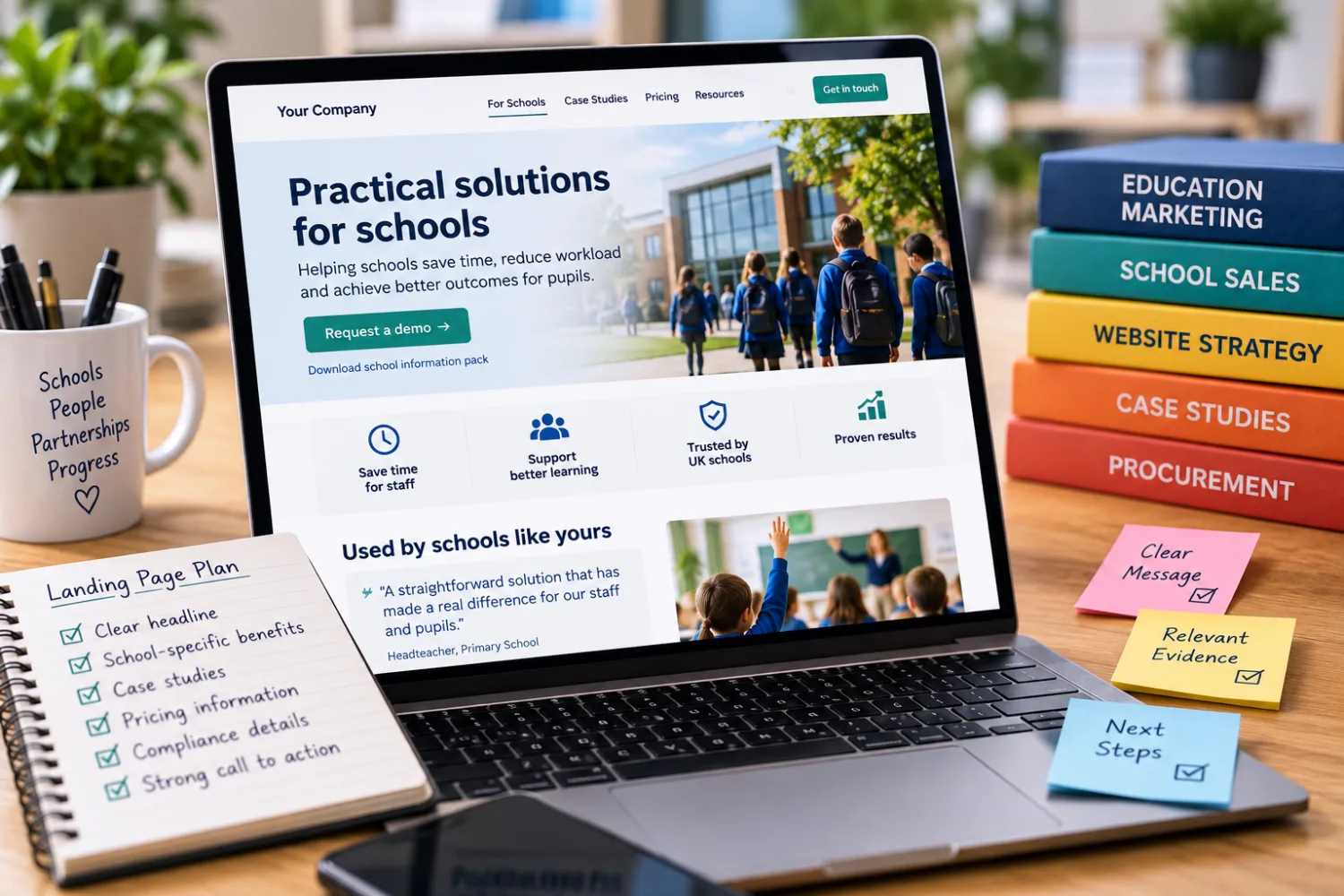
A simple school landing page structure
You do not need an elaborate design.
A strong page could follow this order.
1. Headline
State the school problem and outcome clearly.
2. Short explanation
Explain who the service is for and how it helps.
3. Main call to action
Give the visitor a clear next step.
4. The problem
Show that you understand what the school is dealing with.
5. How your solution works
Explain the process simply.
6. Key benefits
Focus on outcomes rather than an exhaustive feature list.
7. School evidence
Add testimonials, case studies or relevant results.
8. Implementation
Explain setup, training and support.
9. Pricing
Give enough information to help the school qualify the opportunity.
10. Procurement and compliance
Answer practical approval questions.
11. FAQs
Remove the most common remaining concerns.
12. Final CTA
Repeat the next step without introducing a completely new action.
Frequently asked questions
Do school suppliers need a separate schools page?
If schools are an important customer group, usually yes. A dedicated page allows you to address school-specific needs, language, evidence, pricing and procurement questions without making general customers navigate irrelevant information.
Should I create separate pages for primary and secondary schools?
Do so when the buyer, problem, implementation or value case differs materially. If the offer is effectively identical, one well-structured page may be enough.
Should prices be shown on a school landing page?
Where possible, showing at least a starting price or typical range can help schools determine whether the offer fits their budget. Bespoke services may still require a quote.
What should appear above the fold?
The visitor should quickly understand what the product or service does, which schools it is for, what problem it solves and what the next step is.
Should I put compliance information near the top?
Usually not ahead of the core value proposition unless compliance itself is central to the service. Make it easy to find once the school becomes interested.
Do testimonials need to be from schools?
School-specific testimonials are much stronger because the buyer can see evidence that you understand the sector. General testimonials can still support credibility, but they are less persuasive.
How long should a school landing page be?
Long enough to answer the questions needed for the next buying step. A higher-value product may justify a substantial page, while a simple low-cost service may need much less.
Should I include a downloadable brochure?
It can be useful, particularly because school buyers often need to forward information internally. The webpage itself should still contain enough information to understand the offer without downloading anything.
Should the page include a demo video?
If the product benefits from being seen, yes. Keep it focused on the school use case rather than producing a long corporate introduction.
What should the main CTA be?
Choose the action that naturally follows the page: book a demo, request a quote, start a trial or speak to the supplier. Avoid several equally prominent competing actions.
Should I mention MAT pricing?
If you sell to trusts, yes. Even a simple statement such as “MAT and multi-school pricing available” tells trust buyers that the offer can scale beyond one academy.
How can I make a page easier for a teacher to forward to their business manager?
Include clear pricing, implementation, compliance, contract and contact information alongside the educational benefits. The page should answer questions the internal champion may not be able to answer themselves.
What is the biggest mistake suppliers make on school pages?
Making the page about the supplier rather than the school. Long company histories, vague claims and feature lists often appear before the visitor has even been shown why the offer matters to them.
A school-specific landing page should make buying easier.
That is its job.
It should tell a school:
you understand the problem;
your offer is designed for organisations like theirs;
there is evidence that it works;
implementation is realistic;
the price is understandable;
and the paperwork needed for approval is available.
Then it should provide one clear next step.
Do not treat the page as an online brochure full of everything your company has ever done.
Treat it as part of the sales conversation.
The email gets the school to the page.
The page builds enough confidence for somebody to forward it internally.
The evidence reduces risk.
The buying information removes friction.
And the call to action turns interest into a conversation.
If a school buyer reaches the bottom of the page understanding exactly who you help, why your offer matters and what they should do next, the page is doing its job.